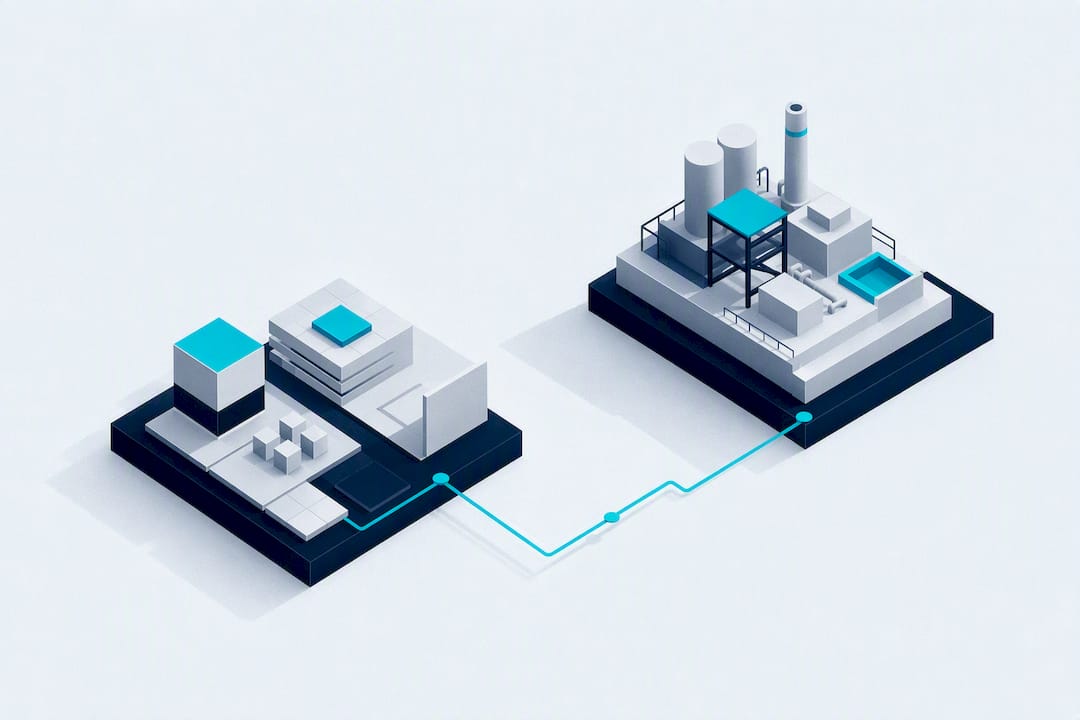
Start by building a small, use-case-led pilot digital twin that connects live sensors to a lightweight 3D model. Pick one high-value asset or line, wire in real telemetry over OPC UA or MQTT, and plan for continuous synchronisation from day one. A no-code, browser-based platform such as Kingfisher 3D SCADA can cut modelling time enough to get that pilot live in weeks rather than quarters. Success looks like a working twin with one measurable KPI, not a photorealistic model nobody trusts.
TL;DR:
- Most successful pilots focus on a single high-value asset or line and aim to demonstrate measurable improvements within three to six months.
- Connecting live sensor data over OPC UA or MQTT through a unified namespace is essential for creating a meaningful and up-to-date digital twin.
- Building a minimal, decision-driven model tailored to specific use cases prevents over-modeling and reduces development time.
- Ongoing TwinOps practices, including validation, version control, and drift monitoring, are crucial for maintaining trust and accuracy over time.
- No-code platforms like Kingfisher 3D SCADA can accelerate pilot deployment by simplifying modelling, supporting existing protocols, and enabling rapid visualization.
Table of Contents
- Choosing the pilot: scope, stakeholders and KPIs
- What data to collect and how to bind it to the twin
- Build the model: level of detail, asset classification and visual choices
- Operate and govern the twin: TwinOps, validation and drift control
- Quality gates and scaling from pilot to multiple use cases
- Practical example: how no-code 3D SCADA shortens time to a working pilot
- Common modelling pitfalls and quality control
- How to validate and expand a pilot
- Author perspective and procurement checklist
- How Kingfisher 3D SCADA can accelerate your pilot
- Sources
- FAQ
Choosing the pilot: scope, stakeholders and KPIs
The single biggest reason digital twin projects stall isn't technology. It's scope. Teams try to model an entire plant before proving value on one line, and the project collapses under its own ambition. McKinsey's research on first-twin builds makes the point bluntly: most failed twin projects tried to model everything at once instead of prioritising a single high-value use case.
Pick the first use case based on frequency and cost of the problem, not novelty. A chiller plant with recurring efficiency losses or a packaging line with unplanned stoppages every shift both make better pilots than a showpiece asset that rarely breaks.
Before any modelling starts, map three things:
- Stakeholders: the operator who watches the screen daily, the engineer who maintains the asset, and the manager who signs off on the budget for phase two.
- Baseline metrics: current mean time to repair, unplanned downtime hours, or energy cost per unit, captured before the twin goes live.
- Minimum data set: the handful of sensor tags and asset attributes that actually drive the KPI you're targeting, not every point the PLC exposes.
Give yourself a three to six month window to show a measurable shift in that baseline. ADB's Digital Twin Framework guide calls this a "Digital Twin Lite" pilot: tailored to one use case, cheap enough to fail safely, and structured to expand once it proves out. That's the model worth copying, whether you're monitoring a chiller plant or a water treatment line.
What data to collect and how to bind it to the twin
A digital twin without live data is just a 3D drawing. Geometry looks convincing in a demo, but Autodesk's modelling guidance is clear that a twin only becomes informative once near-real-time sensor data is bound to it. That binding is the actual engineering work.
Most industrial sites already speak two protocols worth building around:
- OPC UA for structured, hierarchical data from PLCs and DCS systems, common in manufacturing and process plants.
- MQTT for lightweight, publish-subscribe telemetry, especially where you're pulling from distributed sensors or edge gateways.
At the edge, you're typically choosing between a managed ingestion service (AWS's SiteWise and Greengrass are common reference points in AWS's digital twin framework) or a simple edge PC running a protocol gateway. Either way, route everything through a Unified Namespace or equivalent event fabric so every tag has one consistent name across the plant, instead of five different labels for the same pump speed.
For storage, the trade-off is speed versus depth. A time-series database gives you fast writes and quick dashboards. A lakehouse pattern, the kind Databricks describes for twin graphs, gives you the depth needed for historical analytics and predictive work, feeding synced tables back out to your visualisation layer.
Pro Tip: Don't wait for a "clean" data pipeline before starting the pilot. Bind three or four critical tags first, get the twin showing real movement, and build out the data model around what actually proves useful.
Build the model: level of detail, asset classification and visual choices
Over-modelling kills more pilots than under-modelling. If the use case is monitoring vibration on three motors, you don't need a fully detailed CAD replica of the entire gearbox assembly behind them.
- Set level of detail (LOD) by decision, not by asset. Ask what decision the operator needs to make from that view. If they just need to know a pump is running hot, a simplified icon with a colour-coded alarm state does more work than a rendered 3D pump.
- Classify assets at the source. Autodesk Tandem's guidance recommends building asset classification and metadata into Revit or CAD parameters before export, so telemetry maps automatically instead of requiring manual tagging later. Treating those parameters as operational metadata, not just drawing labels, saves significant rework.
- Choose your visualisation layer deliberately. Browser-based 3D scenes with saved views let you build one model and serve different dashboards to different roles: a plant manager's overview, a maintenance technician's equipment-level view, a control room's alarm summary.
- Design for mobile from the start. Traditional 2D SCADA screens rarely translate to a tablet on the floor. A model authored with responsive, browser-native rendering avoids that rebuild later.
The pattern worth internalising: model to the resolution your decision requires, then let the data do the rest of the storytelling. A twin that loads instantly on a technician's phone and shows the right alarm beats one that renders beautifully on a workstation nobody carries onto the floor.
Operate and govern the twin: TwinOps, validation and drift control
A pilot that works today can be wrong in six months if nobody's watching it. Equipment gets swapped, sensors get recalibrated, and setpoints change. TwinOps is the discipline built to handle exactly that: treating the twin definition as a versioned artefact rather than a one-off build.
The stages worth adopting from day one:
- Author the model and bindings, then validate them against known-good readings before anything goes live.
- Deploy to production, synchronise continuously against the live data stream, monitor for drift, and have a defined retire path when an asset is decommissioned.
TwinOps practice calls for immutable published model versions sitting in a registry, with snapshot history that lets you replay a prior state for forensic analysis after an incident. Without that history, nobody can tell whether an alarm misfired because of a real fault or because someone updated a threshold without telling the team.
Validate predictive elements the same way you'd validate a control loop: run golden datasets with known outcomes through the model, then shadow-run it live alongside the process before trusting its output for decisions.
Pro Tip: Set a drift threshold on your key data tags (say, a sensor reading that deviates from its expected range for longer than a defined window) and alert on it automatically. Manual spot-checks catch drift too late to matter.
Quality gates and scaling from pilot to multiple use cases
Model quality shouldn't be a one-off review before launch. Research on digital twin model quality points to workflow-integrated evaluation, checks built into each stage of authoring and deployment, as the more durable approach than a single pre-launch audit.
Track a small set of operational metrics as you scale:
- Data freshness: how stale can a tag be before the twin misleads an operator?
- Model residuals: the gap between predicted and actual sensor readings, tracked over time.
- User adoption: whether operators are actually opening the twin, or falling back to the old screen.
Prioritise the next pilot by reusability. A component library and data mapping built for one chiller plant should drop into the next one with minor changes, not a rebuild.
Practical example: how no-code 3D SCADA shortens time to a working pilot
No-code, browser-based modelling removes most of the installation and scripting overhead that slows traditional SCADA builds. AI scene generation from schematics or photos, paired with a marketplace of ready-made components, can turn weeks of manual authoring into days. A digital twin management platform illustrates the outcome: a large, multi-system environment visualised without a custom-coded build from scratch.
Common modelling pitfalls and quality control
The pitfalls that sink twin pilots repeat across industries, and most trace back to the same root cause: treating modelling as a one-time drawing exercise instead of an ongoing data discipline.
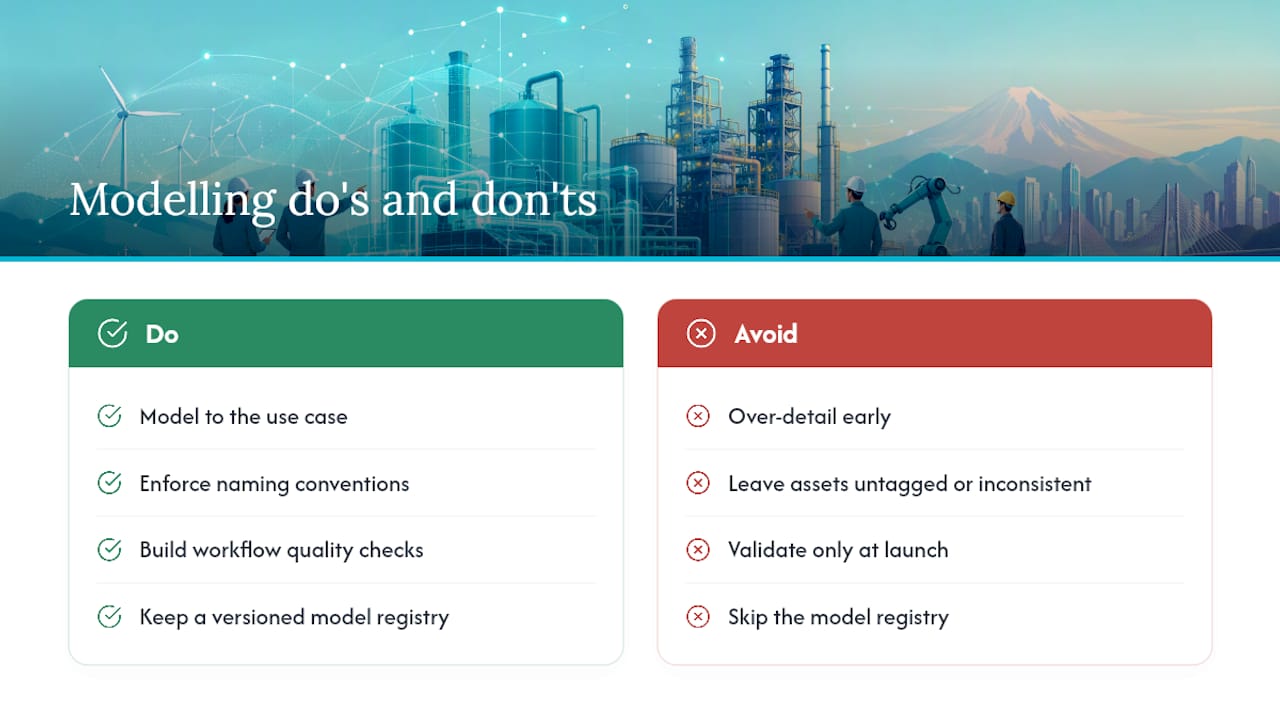
Over-detailing early. Teams that start with a full 3D replica of every pipe and valve spend months modelling before connecting a single sensor. Detail should follow use case, not the other way round.
Untagged or inconsistently named assets. If your CAD export uses "Pump_01" on one line and "P1" on another, telemetry binding turns into a manual mapping exercise that never quite finishes. Fixing naming conventions at the source, in Revit or CAD parameters, avoids this entirely.
No workflow-based quality checks. A twin validated once at launch drifts silently. Building evaluation checkpoints into each authoring and deployment stage, rather than a single pre-launch review, catches problems while they're still cheap to fix.
Skipping the registry. Without versioned model artefacts and snapshot history, nobody can answer "was this reading wrong, or did someone change the model?" That question comes up eventually. Answer it in advance.
Treating the pilot as the finish line. A working pilot proves feasibility. It doesn't prove the data pipeline, governance model, or component library will hold up across ten more sites. Build the pilot knowing it needs to generalize.
How to validate and expand a pilot
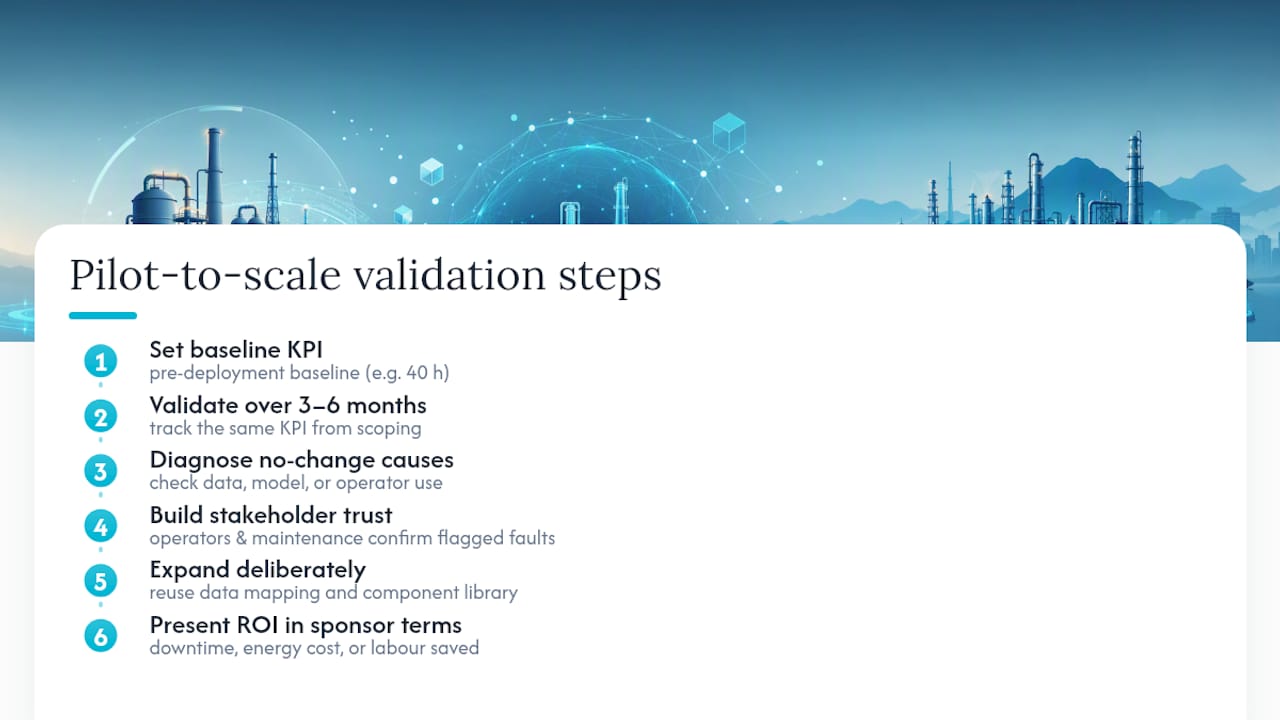
Validation starts with the baseline metric you set before the twin went live. If unplanned downtime on the pilot line was 40 hours a month before deployment, the twin needs to show a measurable shift against that number, not a vague sense that things feel better.
Run the comparison over the three to six month window most practitioners use for a first twin, tracking the same KPI you defined during scoping. If the metric hasn't moved, check whether the problem is data quality, model accuracy, or simply that operators aren't using the dashboard. Each has a different fix.
Stakeholder alignment matters as much as the numbers. The operator who watches the screen daily needs to trust the alarms before they'll act on them, and that trust builds through a few months of the twin flagging real issues, not false alarms. Bring the maintenance engineer into validation, not just the automation team, since they're the one who'll confirm whether a flagged anomaly matches a real fault.
Once the pilot clears its KPI, expand deliberately: reuse the data mapping and component library on the next similar asset first, rather than jumping to a completely different use case. Present the ROI case in the same terms the sponsoring manager cared about at the start, whether that's downtime hours, energy cost, or maintenance labour saved. A twin that proves its case in those terms earns budget for the next one far more easily than a technically impressive model with no attached number.
Author perspective and procurement checklist
Most digital twin failures I've seen traced back to ambition outrunning discipline: teams tried to model an entire site before proving value on one asset. Start small. Show ROI. Then expand.
Ownership matters more than most teams plan for. Someone needs to own TwinOps day-to-day, watching drift, managing versions, and deciding when a model needs revalidation. That's usually a role, not a side task bolted onto an automation engineer's existing workload.
When evaluating a platform or partner, check four things: protocol support (OPC UA, MQTT, and whatever else your site runs), no-code versus custom-build effort, lifecycle and TwinOps support, and whether a component marketplace exists to speed up modelling on the next asset.
— Jeffrey Anastacia
How Kingfisher 3D SCADA can accelerate your pilot
This practical alternative to a custom-coded SCADA build supports teams that want a working pilot in weeks, not quarters. The platform runs entirely in the browser with drag-and-drop scene building, AI scene generation from schematics or photos, and a marketplace of ready-made 3D and 2D components, so you're not modelling a chiller or a pump array from scratch.
Protocol drivers connect straight to your existing OPC UA, Modbus, BACnet, and Siemens S7 infrastructure, which means the pilot you build maps directly onto real plant data from day one. Licensing runs across three tiers to match where you are: Starter at $4,250 for a single-PC pilot, Pro at $8,500 for production rollouts, and Enterprise at $16,900 for larger deployments, each a one-off licence per PC. Browse the smart factory monitoring solution or the full solutions overview to see how the platform fits your sector, then check current pricing and tiers to plan your first pilot.
Sources
- Factory digital twins: recommended modeling practices for achieving scalability | Autodesk Tandem
- Digital Twin Framework: A Practical Guide | ADB
- How to build digital twins for operational efficiency | Databricks
- Digital twin framework on AWS | AWS documentation
- TwinOps: The Operational Lifecycle Architecture for Digital Twins (2026) - IoT Digital Twin PLM
FAQ
What's the fastest way to build an industrial digital twin?
Start with a single high-value asset or line, connect live telemetry over OPC UA or MQTT, and build a lightweight 3D model around that one use case. A no-code platform like Kingfisher 3D SCADA can shorten authoring time significantly by using AI scene generation and a pre-built component marketplace instead of manual modelling.
How long should a digital twin pilot take before scaling?
Most practitioners target a three to six month window to show a measurable shift in a baseline metric like downtime or MTTR, a timeframe McKinsey's guidance on first twins supports. If the KPI hasn't moved by then, the fix is usually data quality or adoption, not the model itself.
What data protocols does an industrial digital twin need?
Most industrial sites run on OPC UA for structured PLC and DCS data and MQTT for lightweight, distributed sensor telemetry. Both should route through a Unified Namespace or similar event fabric so every asset tag has one consistent name across the plant.
What is TwinOps and why does it matter?
TwinOps is the operational discipline of treating a twin's model definition as a versioned artefact, with defined stages for authoring, validation, deployment, synchronisation, monitoring, and retirement. Without versioning and drift monitoring, a twin gradually drifts from the physical asset it represents and operators stop trusting it.