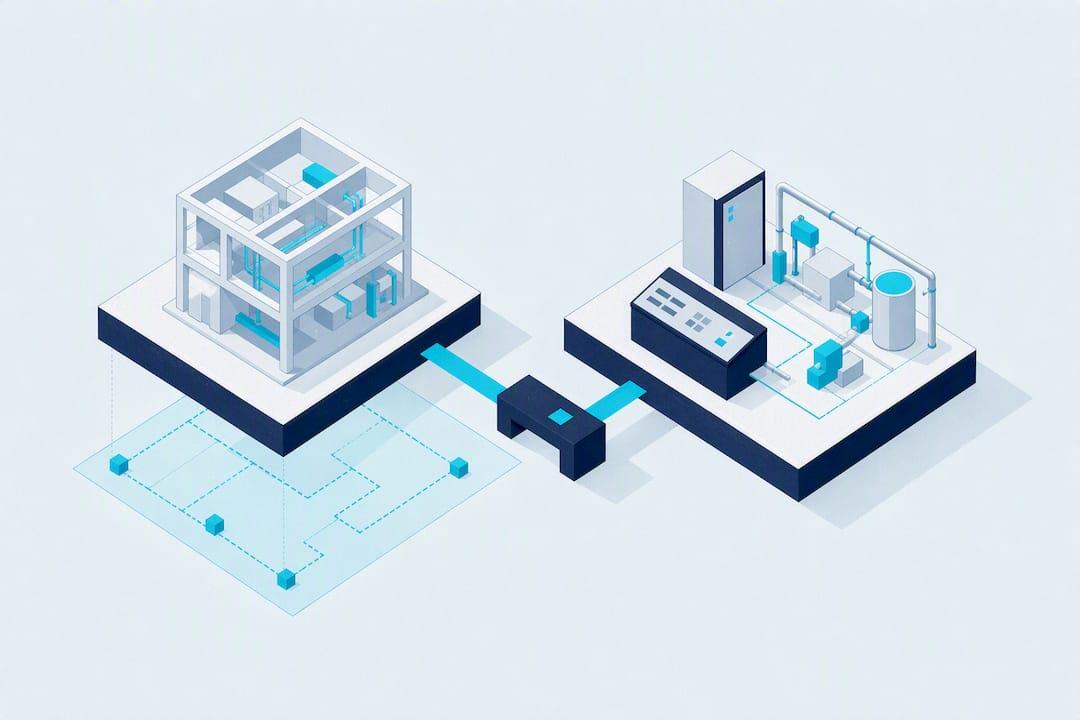
The quickest path is to export IFC (with COBie if your model has it), map every BIM element's GUID to a matching SCADA tag ID, simplify the geometry for runtime, then bind live telemetry through OPC UA or a comparable protocol driver. That sequence gets you a working dynamic digital twin instead of a static file dump. Some no-code platforms handle the geometry simplification and tag binding without custom scripting, which shortens the pilot considerably.
TL;DR:
- Using IFC exports with stable GUIDs and simplified geometry is essential for reliable live data binding in digital twins; re-exporting without maintaining GUIDs causes issues.
- Large and complex models may require an ETL process or custom API adapters for proper attribute mapping and reconciliation beyond native IFC import support.
- Synchronization should match the use case, with event-driven updates for alarms, periodic polling for slow data, and near-real-time streaming for continuous process monitoring.
- Organizational governance, change management, and clear role definitions are the main factors that determine long-term project success, not technical capability alone.
- No-code platforms like Kingfisher 3D SCADA enable rapid BIM to SCADA integration with built-in protocol drivers and asset marketplaces, but governance remains the key to scaling pilots.
Table of Contents
- Why bring BIM into SCADA in the first place?
- What formats and standards actually matter here?
- How do you actually run the import, step by step?
- Which integration pattern fits your project?
- How do you keep a digital twin in sync with reality?
- What governance keeps a project from failing after launch?
- What does this look like with a no-code platform?
- What a realistic pilot actually looks like
- Ready to pilot your own BIM import?
- Sources
- FAQ
Why bring BIM into SCADA in the first place?
A BIM model on its own is a snapshot: accurate on the day it's exported, frozen after that. Feed it live data and it becomes a dynamic digital twin, something operators can actually act on rather than just admire. Autodesk's framing of digital twins treats BIM as the natural starting point precisely because it already carries the multidisciplinary geometry and metadata a twin needs.
The operational payoffs show up fast once telemetry is attached:
- Alarms appear where the fault actually is, not as a flat list of tag names an operator has to mentally map to a physical location.
- Asset metadata (install date, manufacturer, maintenance history) sits one click away from the 3D object itself.
- Maintenance crews get a spatial work order: walk to this valve, on this floor, in this exact spot.
- Control room staff gain situational awareness during incidents, especially across multi-storey or multi-building sites where 2D mimics get confusing fast.
Substation case studies bear this out. BIM, SCADA and digital twin integration has been shown to improve electrical safety and operational monitoring, largely because spatial context cuts the time it takes to locate and isolate a fault.
What formats and standards actually matter here?
Four names come up constantly, and each does a different job.
- IFC (Industry Foundation Classes) carries geometry and metadata together, and it's the backbone of OpenBIM interoperability. The two things that break IFC imports every time: schema version mismatches (IFC2x3 versus IFC4) and missing or regenerated GUIDs after a re-export.
- COBie is a structured spreadsheet format built for handover, listing assets, spaces, and attributes without the full 3D geometry. It's often the cleanest source for populating a SCADA asset table.
- OPC UA is the protocol that carries live telemetry into whatever visualises the model. It's the layer that turns a BIM object into something with a current value, not just a static label.
- BACnet still matters where a building automation system sits between BIM and your SCADA layer, particularly on HVAC and building services projects.
Vendor tooling has started automating parts of this. SCADA Pro's IFC interoperability update automatically recognises structural elements like beams, columns and walls straight from the IFC file, which cuts a chunk of manual classification work out of the process.
How do you actually run the import, step by step?
Skipping steps here is exactly how projects end up with a pretty 3D model and no working alarms three months later.
- Define the use case first. Decide which objects genuinely need live telemetry and which are just visual context. Not every pump needs an alarm; not every wall needs a tag.
- Prepare the model. Clean up junk geometry, apply consistent classifications, and lock in GUIDs on every element you plan to bind later. Attach the metadata fields your SCADA layer will need.
- Export IFC and COBie. Keep GUIDs stable across exports and build a simple attribute sheet mapping BIM properties to the tag names your control system expects.
- Simplify geometry for runtime. Engineering-grade LODs are too heavy for operator consoles. Build a lighter visual LOD that keeps spatial context without the polygon overload.
- Transform and map. Run an ETL step, or your importer's built in mapping settings, to align BIM attributes with SCADA tag addresses.
- Import and bind. Load the simplified model, create tag bindings via OPC UA or your protocol driver, and test alarms and HMI workflows against real or simulated data.
- Validate before rollout. Check spatial alignment, simulate alarm scenarios, benchmark rendering performance, and write down a plan for handling future model revisions.
Pro Tip: Keep a separate registry mapping GUID to tag ID to telemetry endpoint. When you re-export a revised model, that registry lets you re-import without breaking every binding you already built.
Which integration pattern fits your project?
There's no single right answer here, it depends on how messy your data is and how long the system needs to live.
- Native IFC import is the fastest route when your SCADA platform supports it directly. It's fine for straightforward geometry, but metadata depth and runtime performance both suffer on large or complex models.
- Middleware or ETL earns its keep when element IDs need reconciling or attributes need enriching before they hit the SCADA layer. This is standard practice on multidiscipline models where IDs rarely line up cleanly out of the box.
- API or custom adapters suit bespoke, bidirectional needs, particularly where asset relationships are complex enough that off-the-shelf mapping won't hold up.
- OPC UA bridges handle the live side: binding streaming telemetry to the BIM-referenced assets once the static mapping is settled.
Speed to pilot and long-term maintainability pull in opposite directions. A native importer gets you a demo this week; a proper ETL pipeline is what survives your third model revision without falling over.
How do you keep a digital twin in sync with reality?
Sync cadence should match the use case, not a default setting. Some points to work through before locking in a strategy:
- Event-driven updates fit alarms and discrete state changes, where "now" genuinely matters.
- Periodic polling suits slow-moving values like ambient temperature trends or asset condition scores.
- Near-real-time streaming fits process values where operators are watching the number itself, not just a threshold breach.
Treat the BIM model as the authoritative spatial source, but not necessarily the authoritative source for live values. Join the two through GUID-to-tag mapping rather than trying to store live data inside the BIM file itself, an approach NIBS' digital twin guidance backs directly. Decide early whether write-back is permitted at all; most operational deployments stay read-only from SCADA into the model, with delta updates and timestamps used to resolve conflicts when the model itself changes.
What governance keeps a project from failing after launch?
Most BIM-to-SCADA projects don't die from bad software. They die from nobody owning the model six months after go-live.
- Assign canonical asset IDs early and put a real change-management process around model updates, not an informal "just re-export it" habit.
- Lock down network segmentation and access controls between IT and OT, and keep an audit trail of every model change that touches a live SCADA binding.
- Name the roles explicitly: a BIM manager, an OT lead, an IT security contact, and a data steward. Without a named data steward, metadata quality drifts fast.
- Build a testing matrix covering spatial alignment, alarm scenario simulation and performance benchmarks before every rollout, not just the first one.
Research on digital twin deployment backs this up directly: organisational readiness and governance, not raw technical capability, are the main barriers stopping these projects scaling past a pilot. For governance and data stewardship support specifically, Forge AI Deployment's governance services are worth a look if you don't have that capability in house.
Pro Tip: Before any model touches production, run a topographic survey against the as-built site if the BIM model predates recent construction changes. SGS Surveys and similar firms can catch drift between the model and reality before it becomes a false alarm.

What does this look like with a no-code platform?
Kingfisher 3D SCADA was built around the idea that geometry simplification and tag binding shouldn't require a scripting team. Its drag-and-drop import and AI-assisted scene generation take a BIM export or even a schematic photo and turn it into a usable 3D scene without manual modelling.
- Built-in drivers cover the protocols most sites already run: OPC UA, Modbus, BACnet and Siemens S7, so telemetry binding doesn't require a separate middleware layer for common cases.
- A marketplace with over 1,000 ready-made 3D and 2D components speeds up asset creation, particularly useful when a BIM export is missing detailed symbology.
- One documented deployment, a digital twin management platform built for an international airport, shows the pattern working at genuine operational scale rather than as a demo.
Treat this as one practical workflow example, not a universal fix. Complex bidirectional data needs or heavily customised asset relationships may still call for a dedicated ETL or API layer alongside it.
What a realistic pilot actually looks like
Most BIM to SCADA pilots stall on governance, not code. Start narrow: one zone, one system, GUIDs preserved end to end, and a telemetry binding plan written down before a single tag gets mapped. Prove that, then scale.
— Jeffrey Anastacia
Ready to pilot your own BIM import?
If you're weighing up native importers against a custom ETL build, there's a third option that skips most of the setup time: Kingfisher 3D SCADA takes an IFC export and gets it into a bound, working 3D scene without a scripting team or a plugin stack to manage. That's the practical edge over traditional 2D SCADA builds, where geometry simplification and tag mapping usually eat weeks of a project's timeline.
The platform's built-in OPC UA, Modbus, BACnet and Siemens S7 drivers mean telemetry binding doesn't wait on a separate integration project, and the component marketplace covers gaps in your BIM export with ready-made symbols instead of custom modelling. Pricing runs three tiers: Starter at $4,250 USD one-off per PC, Pro at $8,500 USD one-off per PC, and Enterprise at $16,900 USD one-off per PC, all detailed on the pricing page. Try a sample IFC import on your own model, or browse industry-specific solutions to see which tier fits your first pilot.
Sources
- Organisational readiness and governance as barriers to digital twin deployment
- What's new SCADA Pro v.26 - IFC interoperability
FAQ
Do I need COBie if I already have an IFC export?
Not strictly, but it helps. IFC carries geometry and metadata together, while COBie gives you a clean, structured asset table that's often faster to map directly into a SCADA points list.
What's the biggest reason BIM to SCADA projects stall?
Governance, not technology. Research on digital twin deployment found organisational readiness and data stewardship block scaling far more often than any technical limitation.
Can Kingfisher import an IFC file directly?
Yes. Kingfisher 3D SCADA supports drag-and-drop import of BIM exports alongside AI-assisted scene generation, and it includes built-in drivers for OPC UA, Modbus, BACnet and Siemens S7 for tag binding.
How often should a BIM-based digital twin sync with live data?
It depends on the use case: event-driven updates suit alarms, periodic polling suits slow trends, and near-real-time streaming suits process values operators watch continuously. There's no single correct cadence across every asset type.
What does Kingfisher 3D SCADA cost?
Kingfisher offers three one-off per-PC licence tiers: Starter at $4,250 USD, Pro at $8,500 USD, and Enterprise at $16,900 USD, all listed on the pricing page.