
Pick a well-structured SVG library when your project spans multiple SCADA platforms, and use the vendor's native library when you're building on a single runtime and want zero import friction. Modern HMI work leans toward SVG because it scales cleanly across screens without redrawing artwork. Before committing to any set, test one symbol from a candidate library in your actual runtime and check how it binds to a live tag.
TL;DR:
- Neutral SVG libraries are the most flexible for multiple SCADA platforms but require manual tag and layer remapping for proper data binding.
- Choose symbol libraries that include multiple states per object, with clear, consistently named layers, to ensure correct live data animation.
- Running a pilot import and tag-binding test per symbol category can reveal compatibility issues early, saving time during full deployment.
- Using pre-built, standardized marketplace assets reduces rework time and improves consistency across projects compared to custom drawing.
- Organizing symbols with clear naming conventions and version control eases maintenance and prevents mistakes as the library expands.
Table of Contents
- What is a scada symbol library, and which format should you choose?
- What symbol categories should a usable HMI library include?
- How do you integrate symbols into an HMI without breaking bindings?
- How do you pick the right library for your project?
- How does an asset marketplace speed up HMI delivery?
- Best practices for organising and customising symbol libraries
- Are scada symbol libraries compatible with major platforms?
- A field note on integration trade-offs
- Build your HMI faster with Kingfisher's symbol marketplace
- Where to go for formats, editors, and downloads
- Sources
- FAQ
What is a scada symbol library, and which format should you choose?
A SCADA symbol library is a packaged set of graphical objects, pumps, valves, tanks, gauges and controls, built for use inside HMI and SCADA design software rather than general graphic design. The format you choose determines how much rework you'll do later, so it's worth understanding the trade-offs before you download anything.
Four formats dominate the industrial space. SVG (Scalable Vector Graphics) is the current default for web-facing and mobile HMIs because it resizes without pixelation and supports layered states inside a single file. AI (Adobe Illustrator) files are common in vendor design kits, but need conversion before most SCADA tools can use them. EMF/WMF (Enhanced/Windows Metafile) still turns up in older Windows-based HMI packages. PNG/JPG raster formats remain widespread for legacy support, but they don't scale cleanly and each state variation needs its own file.
The trade-off is simple: vector formats give you resolution independence and smaller edits; raster formats give you universal compatibility but bulkier, harder-to-maintain files.
- SVG: best for scalable, high-resolution, and mobile-ready HMIs
- AI: strong for design source files, weak for direct import
- EMF/WMF: legacy Windows compatibility, limited modern support
- PNG/JPG: universal but non-scalable, one file per state
Vector graphics won't slow your project down if you plan for them. Large SVG scenes with hundreds of animated objects can strain browser rendering, so SCADAvis.io's SVG-first toolkit demonstrates why viewport optimisation and hardware-accelerated rendering matter once you scale past a handful of symbols per screen.
What symbol categories should a usable HMI library include?
A genuinely usable industrial control symbols set covers the core process equipment engineers draw again and again, not a token handful of generic icons.
- Pumps — centrifugal, submersible, and variable-speed variants with run/stop/fault states
- Valves — ball, gate, butterfly, and control valves with open/closed/transitioning frames
- Motors — with running, tripped, and reverse-direction indicators
- Tanks and vessels — with fill-level animation support
- Pipelines and fittings — straight runs, elbows, tees, and flow-direction arrows
- Gauges and instruments — analogue and digital readouts, trend widgets
- Operator controls — buttons, switches, selectors
- Electrical symbols — breakers, relays, transformers, switchgear
Each category needs more than good artwork. Check the state-frame count per object (a valve with only "open" and "closed" won't show a transitioning state), and check that layers are named consistently, since data binding depends on the SCADA engine finding a predictable layer name every time. Colour conventions matter too: libraries built around ISA-5.1 style colour coding save time, but only if the colour fills sit on editable layers rather than being baked into a flattened raster.
How do you integrate symbols into an HMI without breaking bindings?
Getting artwork onto a canvas is the easy part. Getting it to animate correctly against live data is where most projects lose days.
- Import the raw asset — drop the SVG or vendor-native file into your design environment and confirm it renders at the intended resolution.
- Check layer and state names — open the symbol's internal structure and verify each state (open, closed, running, fault) has a distinct, named layer.
- Map tags to states — link each named layer to the corresponding process variable or alarm bit.
- Test animation behaviour — trigger each state manually before connecting live data, confirming rotation anchors and colour changes fire correctly.
- Validate on the target runtime — repeat the test in the actual production environment, not just the design tool.
The ThingsBoard PE SCADA symbol widget documentation shows a concrete example of mapping an SVG symbol's behaviour parameters to a live device, which is a useful reference pattern regardless of which platform you're on.
Three pitfalls turn up constantly. Tag remapping breaks when a symbol's internal naming doesn't match your tag database convention. Missing or inconsistent layer names force manual re-editing of every asset. And older libraries exposed as ActiveX/COM controls can hit 32 bit versus 64 bit hosting conflicts on newer runtimes, a problem that has quietly killed more than one migration project.
Pro Tip: Name every layer using a consistent pattern, like pump01.state_running, before you touch data binding. Retrofitting names after 40 symbols are already wired into tags costs far more time than doing it upfront.
How do you pick the right library for your project?
Run through a short checklist before committing budget or engineering hours to any scada symbol libraries you're evaluating.
- Platform footprint — will this run on one vendor's HMI runtime, or do you need it portable across multiple platforms?
- Vector vs bitmap — do your displays include large videowalls or mobile screens that demand scalable vector graphics?
- Animation state count — does each object expose enough states (running, fault, transitioning) for your process, and are layers named clearly?
- Licence model — is it a one-off purchase, a per-seat licence, or a royalty arrangement tied to deployment count?
- Trial validation — pick one symbol from each category and run it through a full import and tag-binding test before buying the whole set.
That last step matters more than it sounds. A short pilot import that checks state mapping, colour overrides, and tag binding surfaces most integration issues before you've committed to a full library purchase. Skipping it is the single most common reason teams end up re-drawing assets they thought they'd already solved.
How does an asset marketplace speed up HMI delivery?
Buying from a curated marketplace is usually cheaper than building custom graphics in-house, because standardised assets reduce rework across projects rather than forcing every team to redraw the same valve from scratch.
- Factory automation components — production line equipment, conveyors, and process skids
- Electrical components — switchgear, relays, and meter graphics
- District energy and thermal components — heat plant and HVAC assets
The practical benefit shows up fastest on repetitive assemblies. Modelling a pump and tank loop by hand, drawing the vessel, wiring the pump states, positioning gauges, typically eats hours per screen. Dragging pre-built, pre-animated components onto a canvas and letting AI-powered scene generation lay out the connections from a schematic or photo cuts that down to minutes rather than hours, because the state frames and layer structure already exist.
Best practices for organising and customising symbol libraries
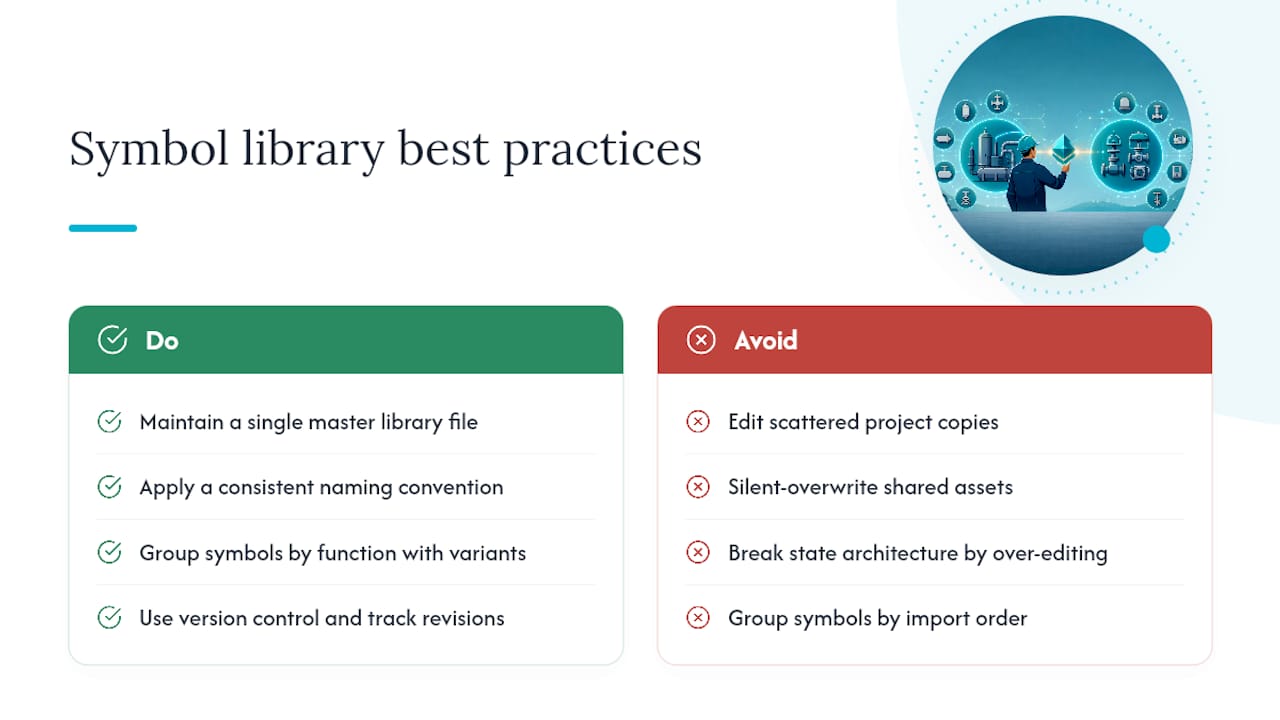
Treat your symbol library as a managed asset, not a folder of leftover files. The single biggest time-saver is maintaining one master set you customise from, rather than editing copies scattered across projects. Every colour override, every renamed layer, every added state should happen in that master file, then get exported for each target runtime.
Naming conventions matter as much as artwork quality. A consistent pattern, equipment_type.instance.state, lets anyone on the team predict what a layer is called without opening the file. This becomes critical once a library grows past a few dozen symbols and multiple engineers are pulling from it.
Group symbols by function, not by import order. Pumps, valves, and motors each deserve their own folder or tag category, with sub-variants (centrifugal vs submersible, ball vs gate) nested underneath. This mirrors how engineers think about a plant and makes searching faster during a live build.
Version control deserves the same discipline you'd apply to PLC logic. When a symbol's animation states or layer names change, every screen using the old version needs re-testing, so track revisions and avoid silent overwrites of shared assets.
Finally, resist the urge to customise everything. Over-editing a vendor or marketplace symbol to match a house style can break the underlying layer structure that data binding depends on. Change colours and labels freely; leave the state architecture alone unless you fully understand what depends on it.
Are scada symbol libraries compatible with major platforms?
Compatibility depends far more on the file format and layer structure than on brand claims. Neutral SVG assets generally import into any platform that supports SVG rendering, but "imports" and "binds correctly to live data" are two different claims, and libraries rarely guarantee the second one out of the box.
Platform-native libraries, built specifically for one vendor's design environment, solve this by skipping the translation step entirely. The trade-off is portability: a library built for one runtime usually won't move cleanly to another without significant rework, which matters if your organisation runs mixed SCADA environments across sites.
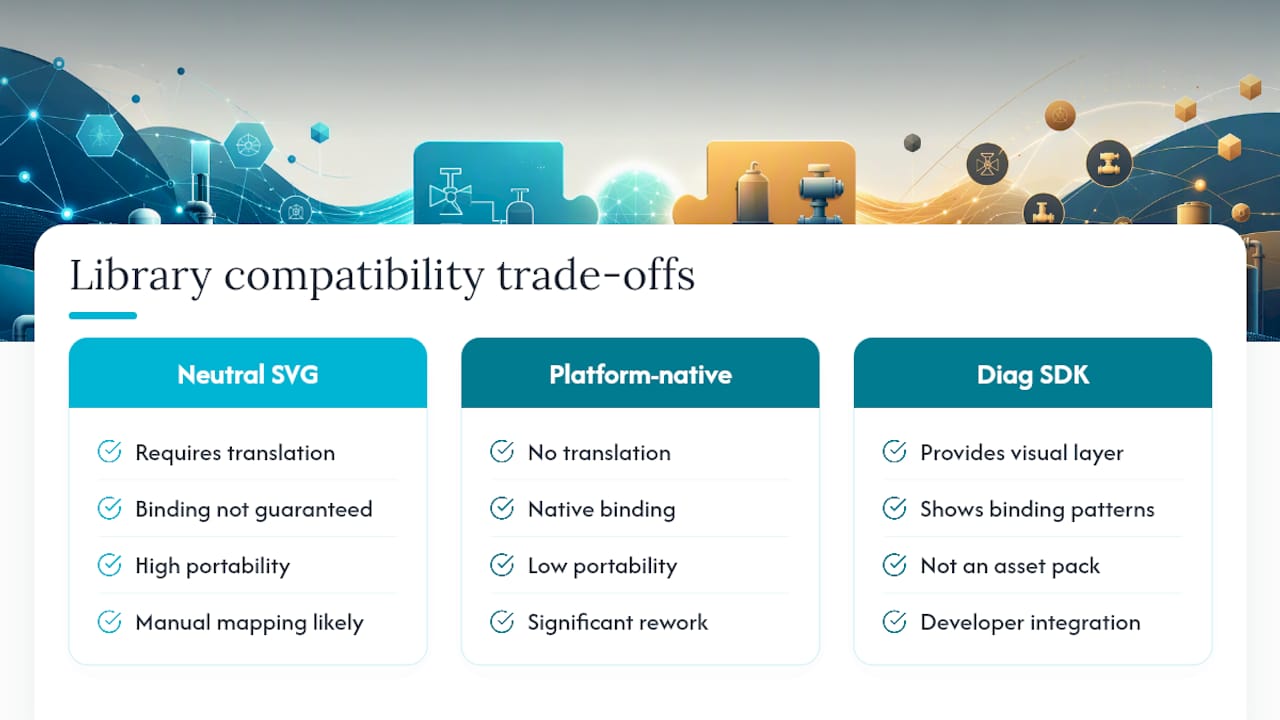
Diagramming and visualisation SDKs sit in a different category again. Tools like JointJS's SCADA diagramming library demonstrate live state rendering and data binding patterns, but they provide a visualisation layer for developers to build on rather than a ready-made asset library, so they're not a direct substitute for a symbol pack.
The practical rule: check whether the library documents its data-binding API, not just its artwork. A library with clear behaviour-parameter mapping will tell you upfront which platforms it supports natively and which need manual adaptation. If that documentation doesn't exist, assume you'll be doing the mapping work yourself, and budget the pilot-test time accordingly before committing to a full rollout.
A field note on integration trade-offs
The gap between a symbol library's marketing screenshots and its actual behaviour on your runtime is where most projects lose time. A pump icon that looks perfect in a vendor's gallery can still fail silently when its "running" state layer has a different name than every other object in the set, and nobody notices until the animation doesn't fire during commissioning.
Pre-animated, consistently structured assets solve more of this than raw artwork quality ever will. Before rolling out any library across a full project, pull one symbol per category through a real pilot: import it, bind it to a live tag, trigger every state, and measure how long that took. If it's clean, scale up. If it's not, you've just saved yourself from finding out the hard way at commissioning.
— Jeffrey Anastacia
Build your HMI faster with Kingfisher's symbol marketplace
Every format decision, layer-naming convention, and pilot test described above exists because building or fixing symbol libraries by hand is slow. A no-code, browser-based platform removes most of that friction: drag-and-drop placement, many ready-made 3D and 2D components, and AI-powered scene generation that builds a working layout from a schematic or photo instead of a blank canvas.
That solves the buyer's actual job, getting a consistent, production-ready HMI built faster, without every engineer redrawing the same valve or renaming layers project after project. The marketplace covers factory, electrical, and thermal packs, so specialised assets are already state-framed and layer-named to the conventions this article recommends. If you're evaluating your next SCADA build, browse the SCADA symbol library and drop one component onto a canvas to see how it binds to live data before you commit to a full project.
Where to go for formats, editors, and downloads
For deeper format and vendor-selection guidance, the HMI symbol library selection guide covers portability trade-offs in detail. If you need SVG-specific editing tools for animated, data-linked graphics, SCADAvis.io's toolkit is built for that. For hardware-specific icons tied to physical equipment, vendor exchange libraries such as Schneider Electric's graphics library package assets across AI, PNG, and SVG formats.
Sources
FAQ
What file format is best for a SCADA symbol library?
SVG is generally the best choice because it scales across screen sizes without quality loss and supports named layers for animation states, though PNG and EMF/WMF still exist for legacy platform support.
Can I use one symbol library across multiple SCADA platforms?
Neutral SVG libraries are the most portable option, but expect to manually re-map tag bindings and layer names when moving between platforms, since data-binding APIs differ between vendors.
How many animation states should a symbol have?
At minimum, expect open/closed or running/stopped states, plus a fault or alarm state; more sophisticated libraries add transitioning states for a smoother visual result.
Is it cheaper to buy a symbol library or build custom graphics?
Buying from an established library or marketplace is typically more cost-effective than in-house custom design, because standardised assets reduce rework across multiple projects.
What should I test before rolling out a symbol library?
Import one symbol per category into your actual runtime, bind it to a live tag, and trigger every animation state manually. This single pilot step surfaces most compatibility issues before a full-scale rollout, and platforms like Kingfisher's marketplace let you trial components this way before committing to a project.